
Beans - Maps for Apartments
One Hundred Feet, Inc.Maps & Navigation
2.1564.00 Reviews
- Version
- 5.4
- Installs
- 50.00K
- Age Rating
- Everyone
Screenshots


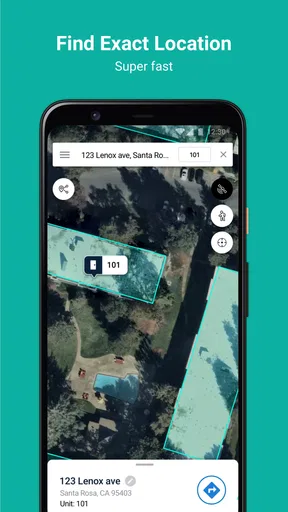
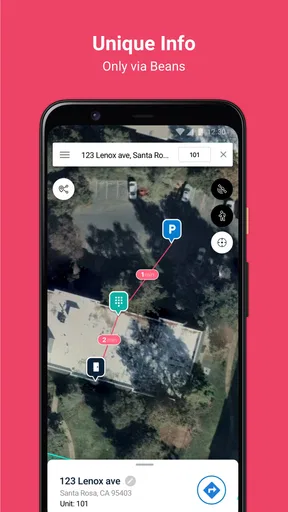
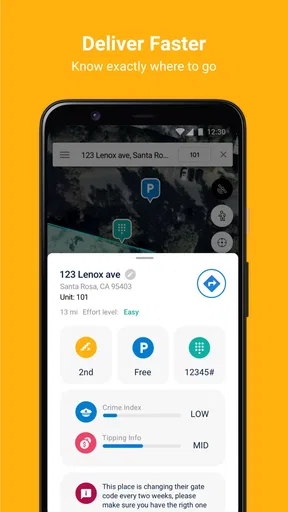
Our Review of Beans - Maps for Apartments
 Analysis by Appyee
Before I install Beans - Maps for Apartments, I’d set one expectation: this is an apartment-focused map app, not a universal navigation tool or a guarantee that every available home will appear. Its appeal is the chance to connect a place to the neighborhood around it, rather than judging a listing from photos alone. If I were moving somewhere unfamiliar, that shift in perspective would be useful from the start.
What I’d expect from the first visit
Beans is a free Maps & Navigation app from One Hundred Feet, Inc., with a focus on apartment locations and related map-based tasks. Its store summary also points toward deliveries, parking, directions, and driving, so the overall idea reaches beyond browsing homes: it is about making apartment-related places easier to find and approach. The app is rated for Everyone, and its current version is 5.4.
It has an average rating of 2.2 from around 1.5 thousand ratings, with about 557 written reviews and over 50 thousand installs. I would treat those figures as a reason to approach it with realistic expectations, not as proof that it will or will not work for me. The app was released on November 19, 2018, and it requires Android 6.0 or later. It is free to install, with in-app purchases listed at $4.99 per item.
Getting oriented before searching
For a first-time user, the simplest path is to start with the place you care about: a neighborhood where you hope to live, an address you want to check, or an apartment area you need to reach. Then use the map to understand where that spot sits in relation to the surrounding streets and destinations. I would avoid trying to answer every moving question in one session. First establish whether the map is useful in the area you’re considering; then decide whether to spend more time comparing places.
This matters because a map can make a search feel concrete before you have all the details. A pin may look promising, but it does not by itself confirm current availability, the exact condition of a unit, or whether the route is convenient at the time you travel. I’d use Beans to build a shortlist and frame better questions, then verify important details directly before making a decision.
Turning a map result into a useful next step
A realistic first win might be finding an apartment area and identifying the route you would take to a viewing. For example, if I had a tour after work, I’d check the address before leaving, look at the approach from the nearest main road, and note a nearby place where I could pause if I arrived early. That small bit of preparation can make a first visit less stressful, especially when unfamiliar streets or apartment entrances are involved.
There is also a useful trade-off in looking at location first. It can stop an attractive listing from distracting me from a long commute or an inconvenient neighborhood, but it can also make me dismiss a place before I have checked the actual route and daily needs. I’d treat the map as a way to compare context, not as a verdict on whether a home is right for me.
Where I’d be cautious
Beans is not the option I’d rely on alone if I needed exhaustive coverage, live availability, or detailed turn-by-turn guidance for a time-sensitive drive. For those needs, I’d cross-check apartment information with a dedicated housing search and use a familiar navigation app for the trip itself. That division of labor is more dependable than expecting one apartment map to replace every tool involved in moving.
The app’s low average rating also makes it sensible to test the basics before building a whole search around it. I’d open a location I already know, see whether the map presents useful apartment context, and try a short, low-stakes search before depending on it for a viewing day. If the local results are thin or the experience does not fit the way I search, switching tools is a practical choice, not a failure.
Finding Your Way Around
First off, navigating Beans - Maps for Apartments is about as intuitive as it gets. The user interface is sleek and user-friendly, which means you won't need a manual to figure out where to click next. From the moment you open the app, you’re greeted with a map that highlights various apartment complexes around your chosen location. It’s like Google Maps but specifically tailored for apartment hunters.
One of the standout features is the search functionality. You can filter by price, number of bedrooms, amenities, and more. This level of customization means you’re not wasting time looking at apartments that don’t fit your criteria. Plus, the map updates in real-time as you adjust your filters, which is super convenient.
The Map Advantage
I must admit, at first, I was skeptical about how useful a map-centric app could be for apartment hunting. But the visual layout really helps in understanding the location context. You can see where the nearest grocery stores, parks, and public transport options are in relation to potential apartments. This is particularly helpful if you're moving to a new city and aren’t familiar with the area.
"The ability to visualize your potential new neighborhood is a huge plus!"
A practical way to use this view is to check a few everyday destinations rather than simply scanning for a single “best” neighborhood. I’d compare how a shortlisted building sits relative to the places I visit routinely, then repeat the check for a second candidate. That side-by-side mental comparison can expose a trade-off a listing page hides: one home may be closer to transit, while another may put groceries or a park more conveniently within reach.
Apartment Details at Your Fingertips
Clicking on an apartment complex on the map brings up detailed information right away. You get high-quality photos, floor plans, and a list of amenities. What I loved most was the inclusion of reviews from current or past residents. These honest assessments provide insights that you might not get from just looking at professional photos and descriptions.
Moreover, the app offers contact details for the leasing offices, so you can easily reach out to schedule a tour or inquire about availability. This seamless connectivity really sets it apart from traditional apartment hunting methods.
I’d use those details as a prompt for specific follow-up questions, not as a substitute for asking them. A floor plan can help me judge whether my furniture might fit, for instance, but I’d still confirm the layout and unit being offered with the leasing office. Similarly, a resident comment can flag a concern worth raising during a tour; it represents one person’s experience, so I wouldn’t assume it describes every unit or every resident.
Keeping Track of Favorites
Another neat feature is the ability to save your favorite listings. If you’re anything like me, you might get overwhelmed with all the options. The "Favorites" feature allows you to bookmark apartments and revisit them later, making it easier to compare your top choices side-by-side.
- Filter by essential criteria
- Real-time map updates
- Comprehensive apartment details
- Resident reviews
- Easy contact with leasing offices
To keep that shortlist useful, I’d save only places that pass a basic first check: location, a plausible layout, and a reason to contact the property. A long list of bookmarks quickly becomes another pile to manage. When I revisit a favorite, I’d note what still needs confirmation—such as current availability or the exact unit—so the saved map pin leads to an action rather than just another round of browsing.
A Few Considerations
While the app is incredibly useful, there are a couple of things to keep in mind. The app’s effectiveness largely depends on the availability of data in your area. In well-populated urban centers, you'll find a plethora of options. However, in more rural areas, the listings can be a bit sparse. Also, while the app is free, some advanced features might require in-app purchases.
Another point worth mentioning is that the app relies heavily on your internet connection, so if you're in an area with spotty service, it might not work as smoothly.
For a first-time renter, I think the best fit is someone who wants to compare apartment locations visually and is comfortable checking important claims with the property before committing. It is less suited to someone who wants one app to provide a complete, guaranteed-current inventory or who needs dependable navigation in areas with poor connectivity. If you are in the latter group, a conventional housing search paired with a navigation app you already trust is the safer combination.
There is a small but useful workflow advantage in separating discovery from verification. I’d first use Beans to spot candidates and save a manageable shortlist, then contact the leasing offices with the same practical questions for each one: whether the unit is still available, what the viewing process is, and whether the details shown match the specific apartment on offer. This makes comparisons fairer, because I’m not judging one property from a detailed conversation and another from a map pin alone.
If the map seems confusing at first, I’d change one thing at a time. Start with a familiar location, adjust a search criterion, and observe what changes; then try a different area. That makes it easier to tell whether the result reflects the filter or simply the local coverage. I would not interpret an empty-looking patch as proof that there are no apartments there, especially if I’m searching outside a dense urban area.
In conclusion, Beans - Maps for Apartments offers a fresh and efficient approach to apartment hunting. It combines the benefits of a map-based interface with comprehensive listing details, making it a must-have tool for anyone in the market for a new place. Whether you're moving across town or across the country, this app could very well be your new best friend in the search for the perfect apartment.
My recommendation is more measured: I’d try it as a location-first companion, not as the only source for a housing decision. Its map-led approach can help a newcomer picture daily life around a possible home, while filters and saved choices can bring some order to an otherwise sprawling search. The key is to turn each promising result into a checkable next step—confirm details, ask the leasing office, and visit when possible.
For someone who already knows exactly what they need from a standard listing search, Beans may feel like an extra step. But if your main question is “Would this place work for my routine and the area I’m moving to?”, opening the map before making calls is a sensible way to begin. I’d install it, test a familiar location, and keep it only if the local view genuinely helps me choose where to look next.
Verdict
Strengths of Beans - Maps for Apartments
- User-friendly interface for easy navigation.
- Detailed floor plans of multiple apartments.
- Real-time availability updates.
- Customizable search filters enhance user experience.
- Smooth integration with map services.
Limitations of Beans - Maps for Apartments
- Limited to certain cities or regions.
- Occasional lag when loading images.
- Requires a stable internet connection.
- Some features locked behind a paywall.
- Notifications can be overwhelming at times.
Similar Picks in This Category
View All
Uber - Request a ride
Uber Technologies, Inc.4.7


inDrive. Rides with fair fares
® SUOL INNOVATIONS LTD4.8

Yandex Go: Taxi Food Delivery
Mikromobilnost LLC Belgrade4.8

Bolt: Request a Ride
Bolt Technology4.8

Rapido: Bike-Taxi, Auto & Cabs
Rapido Bike Taxi4.8
Frequently Asked Questions
What is Beans - Maps for Apartments used for?
Beans - Maps for Apartments is designed to help users navigate complex apartment complexes with ease. It provides detailed maps and directions within apartment communities, making it easier for delivery drivers, service personnel, and visitors to find specific units without hassle.
Is Beans - Maps for Apartments free to use?
Yes, Beans - Maps for Apartments is free to download and use. However, there may be optional in-app purchases or premium features available for users who require advanced functionalities or ad-free experiences.
Which platforms support Beans - Maps for Apartments?
Beans - Maps for Apartments is available on both Android and iOS platforms. Users can download the app from the Google Play Store for Android devices and the Apple App Store for iOS devices, ensuring wide accessibility and ease of use across different smartphones.
Does Beans - Maps for Apartments require internet access?
Yes, Beans - Maps for Apartments requires an internet connection to download the latest maps and updates. While some features might work offline, having an active internet connection ensures you have the most accurate and updated navigation information.
How accurate are the maps on Beans - Maps for Apartments?
The maps on Beans - Maps for Apartments are regularly updated to reflect real-world changes, ensuring high accuracy. The app relies on community feedback and professional mapping services to provide precise directions within apartment complexes, but users should report any discrepancies for improvements.
